Serein Devices001

Isobare

One click. Four scenes. An ambient arrangement.

Give your MIDI tracks a role and Isobare fills Live's grid with four related scenes. It writes notes, leaves your instruments alone, and gives you something worth reacting to.

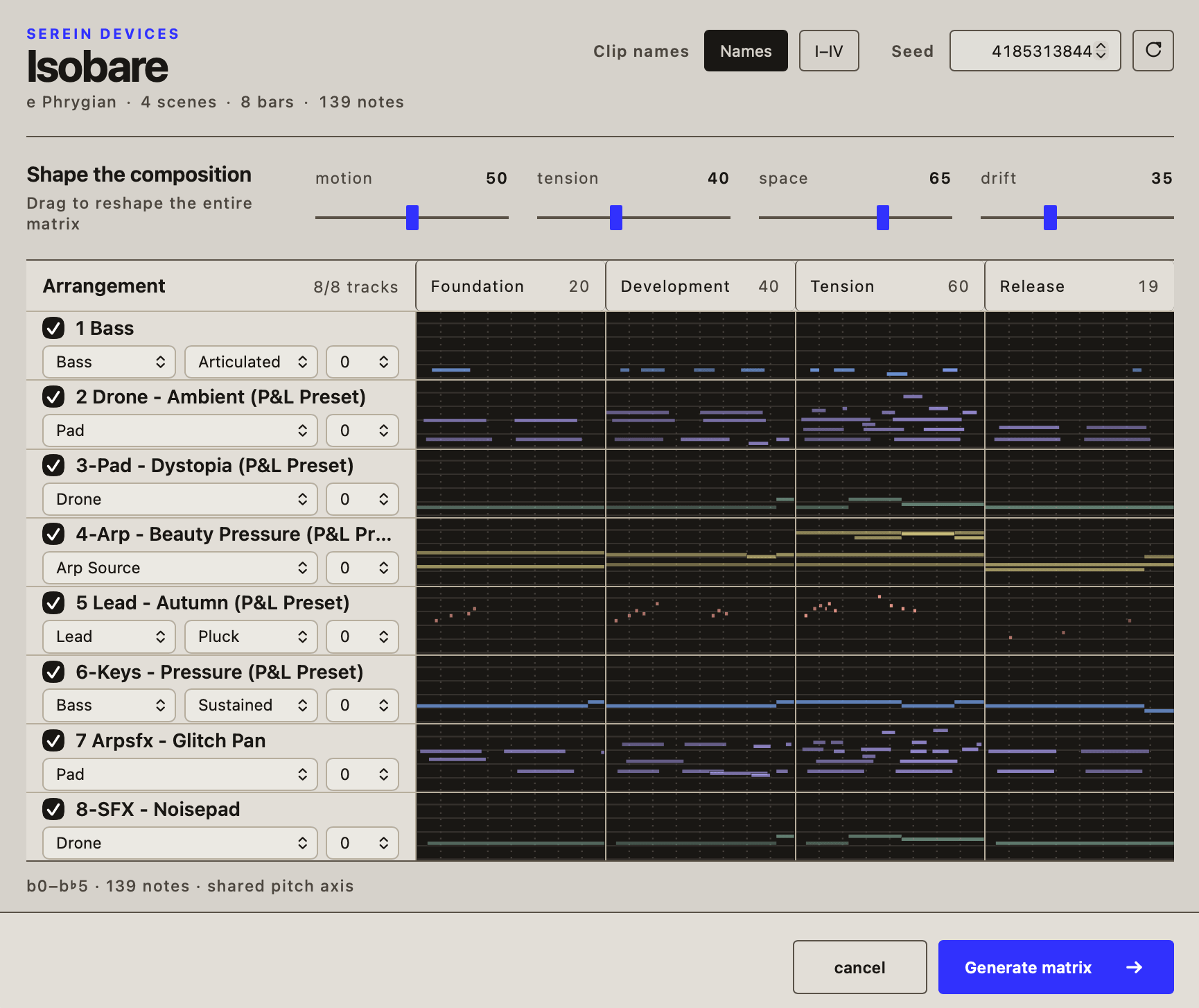
The Isobare device showing eight MIDI lanes arranged across four scenes

What it does

  • Fill the grid

    Right-click an empty clip slot. Isobare writes up to eight MIDI tracks across four scenes, all in one undoable step.

  • Cast the parts

    Pick Bass, Pad, Drone, Arp or Lead, then steer the result with Motion, Tension and Space.

  • Keep the good accidents

    Preview every note before committing. Save the seed and the same recipe will make the same arrangement again.

Before you start

  • Ableton Live 12 with Extensions enabled and Developer Mode on.
  • Global Quantization set to 8 Bars; Global Scale set to your key.
  • An empty clip slot on at least one MIDI track.

Download

Download Isobare (.ablx)
Version
0.1.2
Published
Size
59 kB
Platform
Ableton Live 12 · Extensions

Changelog

Isobare 0.1.2

Changed
  • Full UI rework.

Isobare 0.1.1

Changed
  • Isobare now identifies Serein Devices as its author in Ableton Live.

Isobare 0.1.0

First public release. Isobare generates a coordinated matrix of looping MIDI material for performing ambient music in Ableton Live’s Session View.

Added
  • Ambient Matrix generation. Right-click a Session View clip slot and choose Generate… to fill up to eight consecutive MIDI tracks across four Scene rows — Foundation, Development, Tension and Release — from a single shared composition plan. The whole matrix is written in one undo step.
  • Five Musical Roles. Bass, Pad, Drone, Arp Source and Lead, each with its own register, density and phrasing behaviour. Bass can be Articulated or Sustained; Lead can be Pluck or Flow.
  • Three performance macros. Motion sets how much the material moves, Tension runs from consonant to abrasive, and Space from compact to open.
  • Seed control. Every dialog opens on a fresh seed, and an identical recipe always produces identical MIDI. Randomise to explore, keep the number to return to a result exactly.
  • Live preview. The dialog draws every generated note on one shared pitch axis, so you can read register, entrances and density across the whole matrix before committing. Click a Scene heading to stack that Scene’s lanes together.
  • Overwrite protection. Occupied clips are counted up front and preserved unless you explicitly consent to replacing them. Missing Scene rows are appended for you.
  • Your instruments, untouched. Isobare writes MIDI only. It never inspects or changes your tracks, devices or mix — the sound stays yours.
Notes
  • Set Live’s Global Quantization to 8 Bars before using the extension. Every generated clip is exactly 8 bars, so Scene launches then land on cycle boundaries and the matrix stays in sync.
  • Set Live’s Global Scale before before using the extension. Isobare reads Live’s project scale, with Scale Mode off, Isobare uses C major.

All releases on GitHub

All devices